The Gmail "Dots" Issue Explained
Even though it has been more than a decade and a half since Google launched Gmail, users regularly post about receiving emails intended for someone else, addressed to a dot (or the dotless) variant of their username and wonder if the other person is receiving their emails in turn as well. So, it won't be unfair to say that the Gmail "dots" issue is still one of its most misunderstood features.
This blog is my take on this issue. I have shared all relevant information that is known to me on this issue through three section guides detailing what the issue is in reality, common rebuttals, and practical self-tests you can perform to dispel any doubts.
1. The Reality of the Issue: What Exactly Happens?
What happens is the simple act of someone (say Person A) giving out an email address that they incorrectly think is theirs, but in reality, belongs to someone else (say Person B).
In almost all cases, both share the same first and last names as this confusion seems to happen most with such usernames. When that happens, emails intended for Person A get sent to Person B in much the same manner as phone calls or letters intended for Person A will reach Person B if the phone number or street address of Person B was given out by Person A instead of their own.
Just as the sharing of the phone number or street address was an error on the part of Person A and didn't make Person B's phone number or street address theirs; similarly, the sharing of Person B's email address by Person A or someone else is an error on their part and does not make Person B's email address theirs.
Prior to Gmail, other free email providers would count the period "." as a character, which meant that username@domain.com would be a separate username from user.name@domain.com.
But that doesn't happen with Gmail. When Gmail arrived on April 1, 2004, they introduced several new concepts in email, such as Labels instead of Folders, Search instead of Sort, and Grouped messages (Conversations) instead of ungrouped ones. Additionally, they chose to ignore case and dot variants of a username.
What that meant was, when someone registered a Gmail username, they also owned all possible dot variants (and one dotless variant) as well as all possible upper/lower/mixed case variant aliases of that registered username, leaving no way for anyone else to subsequently register any of those variants.
2. The Common Rebuttals
"This is something introduced later and was not the case when Gmail was launched."
Many users dispute that this wasn't the case when Gmail was launched. Here is a screenshot of one of the earliest recorded references of the feature from Errorik's Archive (April 2004), written a month after Gmail's launch, highlighting this exact behavior:

"My account is username@googlemail.com and I'm receiving emails sent to username@gmail.com"
Due to legal reasons, Google offered the @googlemail.com domain in the UK and Germany for the first few years after launching Gmail in 2004. Usernames registered under @gmail.com were made unavailable from being registered under @googlemail.com and vice-versa. By blocking all those aliases as available options for a separate username, Gmail prevents what would otherwise be an easy way to impersonate someone.
As a consequence, besides owning all possible dot variants and the dotless variant of their username, a user also owns the username@googlemail.com alias for their registered username@gmail.com address. All incoming emails addressed to any dot/dotless variant, regardless of the @gmail.com or @googlemail.com suffix, deliver directly to the same inbox.
This can be corroborated by looking at the message headers for any incoming emails received at your @googlemail.com address, as detailed in the self-tests section below.
3. The Self-Tests: The Proof of Impossibility
There is no better way to be convinced than by running the tests yourself. Assuming for a moment that username@gmail.com and user.name@gmail.com were two separate Gmail accounts:
-
Attempting to register a dot or case variant:
If they were separate, it would be possible to register dot/dotless/case variants after creating an account. However, attempting to register any variant displays an error that the username is unavailable:

-
Signing in with dot variants:
You can sign into your account using any dot, dotless, or case variant alongside your normal password. Clicking the circular profile icon in the top-right will always display your primary registered address, confirming that all variants point to the exact same account.
-
Forwarding emails to a dot variant:
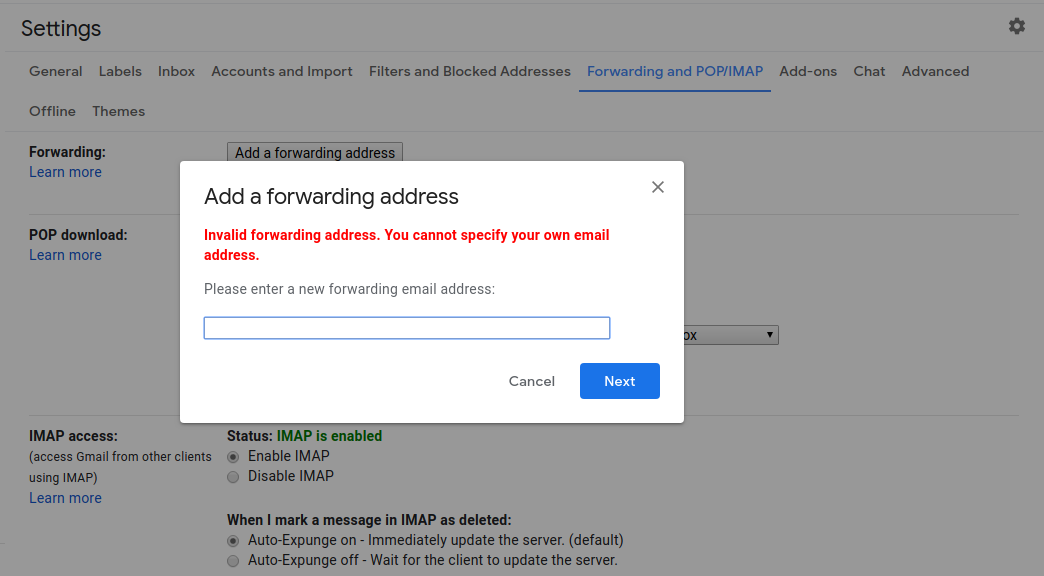
Attempting to forward messages from your primary Gmail username to any of its dot or case variants will immediately trigger an explicit forwarding error:

-
Adding dot variants to "Send mail as":
Normally, adding an external address under Gmail's "Send mail as" settings requires a verification step:

However, when adding a dot variant or
@googlemail.comversion of your own address, no verification email is required. Clicking "Next Step" immediately adds it as a usable sending alias:
-
Inspecting header routing (Googlemail vs. Gmail):
Open an email sent to your
username@googlemail.comaddress, click the three-dot menu, and select Show original. Comparing the headers shows that while To lists@googlemail.com, Delivered-To displays your primary@gmail.comaddress, proving both routings terminate in the exact same inbox.




Finally, there is the complete absence of proof. In all these years, there has been zero documented proof that username@gmail.com and user.name@gmail.com exist as two separate Gmail accounts.
So please explain to me why google didn't allow me to use my first and last name without a dot when I registering my first gmail.
ReplyDeleteIt was disappointing for me to write an error message that it was busy.
Just for that reason, I registered my gmail as name.surname.
And now I'm reading this.
By the way, I only started searching on the basis of an email that was delivered to my address with a dot, but it was addressed to an address without a dot.
The e-mail service sent to me is unknown to me and I have never used it.
"
noreply@kaps.co.ke
04.11.2021 16:32
for: name.surname
Reload for A-Card: ****** of 200/- was successfully received. Your current A-Card Balance is Kshs. 310/-. Kindly visit to have the balance effected.
"
There is no reason unless it actually resembled an existing registered username.
DeleteHowever, with name.surname@gmail.com registered, you can always do the following:
1. Visit the Gmail settings Accounts and Import tab (https://mail.google.com/mail/u/0/#settings/accounts)
2. Scroll down to the "Send mail as:" section
3. Click on the "Add another email address" link
4. Add namesurname@gmail.com in the Email address field and click on the "Next step" button
5. And that address will get added as a send mail as option. If you want to make that version of your username default, you can click on the "Make default" link next to it. You can also adjust the "When replying to a message:"option accordingly
6. Finally, be sure to click on the "Save changes" button at the bottom of the page.
This should resolve your issue.
I can give you proof.
DeleteWhenever I forgot my Playstation Network password, I would enter my email ikxx.pxx@gmail.com but would never receive the recovery mail afterwards.
Instead, I am always receiving Playstation promo mails adressed to one ikerpaz22 (mail ikxxpxx@gmail.com) which is not me ( my PN id is different).
At one point I had to switch my email to a different email adress.
Of course I keep getting those promo emails addressed to that other person in my other email account.
I bet that ikerpaz22 is receiving all my recovery emails.
You can copy/ paste all the google statements you wish, the issue exists.
I was also unable to create my gmail account without dot, which I hated at that time because I knew someone else already had the dotless version.
I appreciate the long response, but where is the undeniable proof of your claim?
Delete"I bet that...." and "because I knew..." are not proof.
In the contrary, you receiving emails addressed to one of the dotted versions is proof that both usernames are aliases of each other and direct to the same Gmail inbox.
You may not have done all the self-tests I suggested above; particularly where I recommended sending an email to any of the other versions and also where I recommended signing into the account using any of the other versions of your registered username and the password.
My issue is similar but different, that is Gmail seems to drop numbers. I frequently get emails saying thanks for signing up to xyz service please verify your email. The message comes to me but the account is actually say tmacdo7@... Not tmacdo@. This happens way too often for all these people to mistakenly putting in my address and not their own. I have to think that google is the root of this issue.
ReplyDeleteYou need to look at message headers to determine how such emails are reaching your Gmail inbox. Try the suggestions mentioned here - https://blogs-on-gmail.blogspot.com/2021/01/how-did-this-email-reach-my-gmail.html.
DeleteSomnath, thank you for this amazing fact about dots in gmail! So, impressed that I've made a tiny tool to demonstrate how it works in practice - dotornot.fun ))
ReplyDelete